How to Redeem Barber Showdown Codes
Lobby-only steps so Cash, clippers, and cosmetics land in your account.
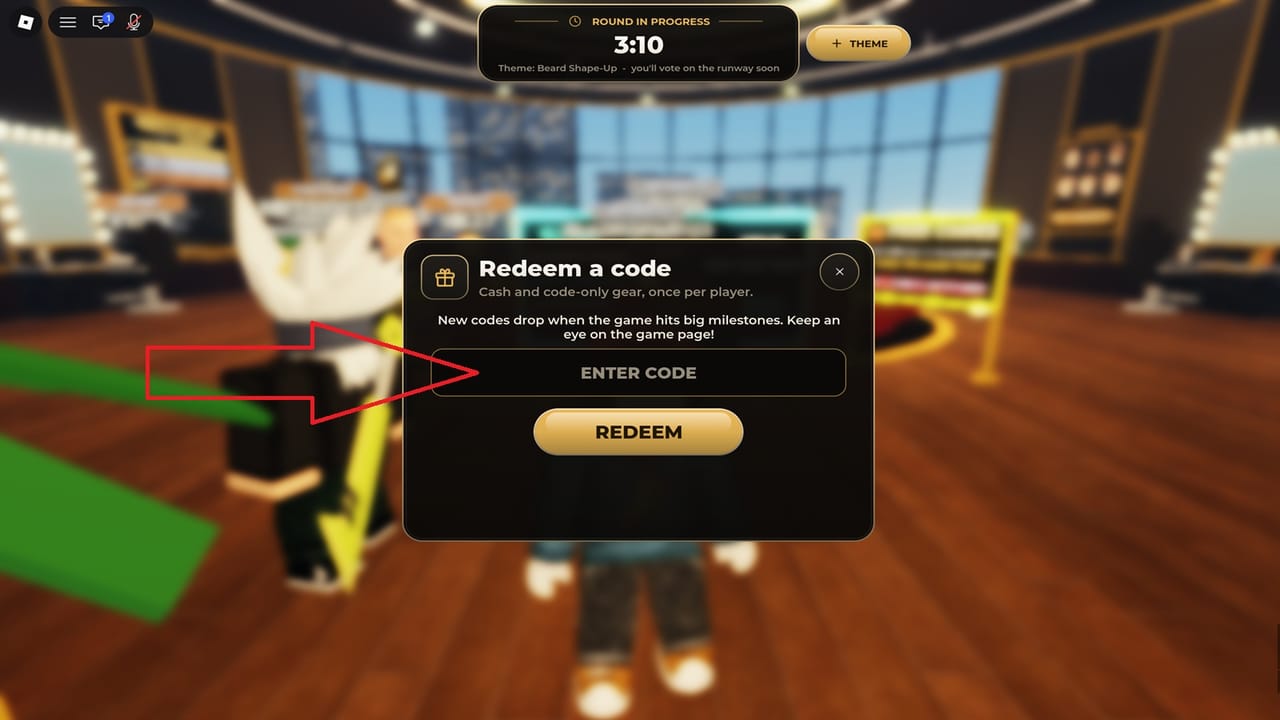
Redeeming Barber Showdown codes is simple once you know the lobby flow, but most failed attempts happen because players try mid-cut or mistype a case-sensitive string. This page walks through the exact sequence, common error messages, and what to do after Cash or items arrive so the reward actually helps your next runway score.
For the live list of working and expired strings, stay on the Codes Hub. Pair free Cash with the Getting Started checklist and Cash Fast tips so you do not park rewards in inventory forever.
Before you redeem
- Finish or leave the current round. The CODES button lives in the lobby, not during the five-minute cut or the runway walk.
- Copy the code carefully. Codes such as
CREWSUP,1MVISITS,FRESHCUT,CREWCUT, and100KVISITSuse specific capitalization. Do not add spaces. - Have inventory space awareness. Clippers and capes equip from your owned tools/cosmetics after a successful redeem.
- Stable connection. A disconnect between Redeem and confirmation can make you unsure whether the code consumed—rejoin and check Cash/items before retrying.
Step-by-step redemption
- Complete your cut or exit the match until you are fully in the lobby with other waiting players.
- Look to the right side of the lobby UI for the CODES button.
- Open the codes panel and click into the text field.
- Enter the code exactly as shown on the Codes Hub (example:
FRESHCUT, notfreshcut). - Press Redeem and wait for the success feedback.
- Check your Cash total and newly granted items. Equip Platinum, Sapphire, or Blurrple clippers before queuing again if that was the reward.
If the panel never opens, you are still in a cut, on a results screen, or on a soft-load state—return to a clean lobby first.
What each reward type means
- Cash — Spend on tools and progression purchases that improve outline quality and theme accuracy. See tools and controls for how clippers, trimmer, razor, scissors, blend, dye, and dryer fit a round.
- Named clippers (Platinum, Sapphire, Blurrple/Blurple) — Cosmetic or branded tools that still cut; treat them as usable gear, not shelf trophies.
- Capes and cosmetics (Royal Purple Cape, etc.) — Flex items for lobby and runway presentation; they do not replace clean fades.
Ranking which tools matter most for winning is covered in the Tools Tier List.
Troubleshooting failed redeems
Code invalid / does not work
- Recheck spelling and case against the hub table.
- Confirm the code is not in the expired list (
FRESHSTARTis already dead). - Leave the lobby once, rejoin the experience, and try a single clean attempt.
No CODES button
- You are not in the lobby. Finish the runway ratings or leave the round.
- On mobile, rotate or expand UI if a safe area is covering the right-side controls.
Success but no item visible
- Refresh inventory / tools menu.
- Soft rejoin the server.
- Confirm you redeemed the code you think you did—Cash-only codes will not spawn a cape.
Already redeemed
- Most promo codes are one redeem per account. Duplicate attempts fail even while the code remains active for others.
After you redeem: first five minutes
- Equip the new clippers if granted.
- Jump into solo practice if you want to test feel without wasting a competitive round.
- Or queue a normal match and focus on theme accuracy—codes do not raise your star rating by themselves.
- Apply Cash toward gaps in your kit (trimmer for edges, razor for outlines, blend for transitions) rather than impulse cosmetics.
- Log daily quests and streak rewards so code Cash stacks with regular income.
New players should continue with Getting Started, then study five-star cuts and haircut themes so free tools convert into wins, XP, and crew points.
Safety notes
- Only redeem codes inside the official Barber Showdown experience on Roblox.
- Never paste codes into random Discord DMs, “generator” sites, or executor prompts.
- This wiki does not sell codes. Official drops are free via the lobby panel.
- For Discord announcements and the Roblox place link, use Official Links.
Related pages
- Codes Hub — active and expired tables
- Cash Fast — turn rewards into progress
- Barber Pass Season 1 — seasonal track through December 1, 2026
- Players Hub — ranks, crews, Pro League
Redeem once, equip immediately, then get back on the chair. Clean edges beat unused inventory every time.
Frequently Asked Questions
Quick answers to the most common Barber Showdown questions.
Where is the CODES button in Barber Showdown?
In the lobby on the right side of the screen. It does not appear during the five-minute cut or the runway walk.
Why did my code say invalid?
Usually wrong capitalization, extra spaces, an already-redeemed code, or an expired string such as FRESHSTART. Compare against the Codes Hub table.
Do I need to restart Roblox after redeeming?
Normally no. If Cash or items do not show, soft rejoin the experience and re-open your tools or cosmetics menus.
Can I redeem the same code twice?
No. Promo codes are typically one redeem per account even while they stay active for other players.