Getting Started in Barber Showdown
Learn the shared-theme loop, tools, and first-session checklist.
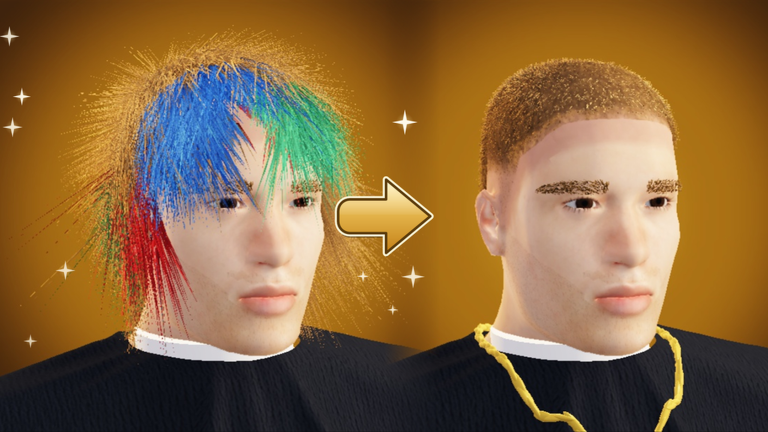
Barber Showdown throws you into a competitive barbershop where every player works the same customer under the same theme. You have roughly five minutes to cut, then you walk the runway while the server rates you from one to five stars with emoji reactions. Highest stars bank the best Cash and XP. This beginner guide covers your first hour: lobby orientation, tool roles, practice mode, codes, and how to stop losing stars to messy outlines.
When you finish this page, continue with Five-Star Cuts, Haircut Themes, and Tools and Controls. Free Cash from the Codes Hub should fund early tool gaps, not random cosmetics.
What kind of game this is
- Genre: Party and casual minigame on Roblox.
- Creator: ignorantsinner / Miniooonz.
- Server size: About twenty players in standard lobbies.
- Win condition: Most stars on the shared runway after the timed cut.
- Long-term goals: Ranks (Apprentice toward Legend), crews, Barber Pass Season 1, and Pro Servers once you hit Barber rank.
You are not building a unique character loadout that diverges each match. Skill is reading the theme, executing clean geometry, and finishing with a polished look before the timer.
First-session checklist
- Launch from the official Roblox place (linked on Official Links).
- Sit through any short onboarding prompts, then open the lobby UI.
- Redeem live codes via the right-side CODES button—full steps on How to Redeem.
- Enter solo practice for one calm cut before your first rated round.
- Queue a live match. Prioritize symmetry and theme accuracy over finishing in two minutes.
- After results, note which edges failed. Adjust tool order next round.
- Claim daily quests, check streak status, and skim playtime gift timers.
The five-minute chair
Treat the timer as phases, not a panic sprint:
- Read the theme (Low Fade, The Edgar, Mullet Monday, beard shape-up, two block, and others). Confirm what “done” looks like.
- Bulk with clippers on sides and large regions.
- Refine length with scissors where the style needs soft shape.
- Blend transitions so steps disappear.
- Trimmer and razor for crisp edges, hairlines, and beard lines.
- Dye only after the shape is right—color will not hide a bad silhouette.
- Blow dryer and texture powder for finish and hold before runway.
Tattoos and piercings exist as extra flair when the brief allows; do not abandon the haircut to decorate first.
Tool roles in one paragraph
Clippers remove bulk and shape sides. Trimmer cleans edges. Razor outlines. Scissors control length and soft styles (locs, fringe, shag, grow-outs). Blend smooths guards and transitions. Dye recolors after structure. Blow dryer finishes. Texture powder adds grip and definition. Detailed bindings for PC, mobile, and controller live on Tools and Controls. Community usefulness rankings live on the Tools Tier List.
Scoring mindset
Servers reward looks that match the theme, stay symmetrical, and show clean edges. Speeding through a Mullet Monday that looks like a random shag will lose to a slightly slower, on-brief mullet. Use undo when a pass goes wrong. Orbit the camera to catch uneven sides before you lock in.
Early economy
Cash comes from round placements, quests, streaks, playtime gifts, Cut of the Week participation, codes, and optional 2x Cash gamepass. New players should:
- Redeem active codes immediately.
- Complete dailies every login.
- Protect streaks when possible.
- Buy missing edge tools before expensive flex cosmetics.
- Read Cash Fast once the basics feel comfortable.
Ranks, crews, and Pro (preview)
You climb from Apprentice toward Legend through consistent play. Crews add tags, crew points, and weekly payouts. At Barber rank you unlock Pro Servers: about eight players, votekick, x1.5 XP, and Pro League progression from Rookie toward Champion. Full detail sits on the Players Hub. Season rewards are tracked under Barber Pass Season 1 (thirty tiers through December 1, 2026).
Common beginner mistakes
- Ignoring the theme card and freestyling.
- Dyeing before the cut is shaped.
- Skipping blends so clipper lines stay harsh.
- Never using undo or camera checks.
- Trying to redeem codes mid-round.
- Spending all Cash on capes before owning a complete tool kit.
- Leaving practice unused, then tilting after one bad lobby.
What to read next
- Five-Star Cuts — star farming fundamentals.
- Haircut Themes — theme cheat sheet.
- Cash Fast — income routes.
- Guides Hub — full map of tutorials.
- Updates Hub — patch and season context.
Play one intentional practice cut, one live round focused on edges, and one round focused on theme accuracy. That three-round loop teaches more than ten rushed matches.
Frequently Asked Questions
Quick answers to the most common Barber Showdown questions.
Is there a practice mode in Barber Showdown?
Yes. Use solo practice to learn tools and themes without runway pressure, then move to live lobbies for Cash and XP.
How do I win a round?
Match the shared theme with a clean, symmetrical cut in about five minutes. The server rates runway looks from one to five stars; most stars wins.
Should I buy the 2x Cash gamepass first?
Only after you understand themes and edges. The pass speeds income but does not fix low star averages.
Where do I redeem codes as a new player?
Return to the lobby, open the right-side CODES button, and follow How to Redeem. Start from the Codes Hub list.
When do Pro Servers unlock?
At Barber rank. Pro lobbies are smaller, offer x1.5 XP, support votekick, and feed Pro League ranks.